This is strictly for BEGINNERS & pros can refer it too.
Get User / Device Current Position Lattitude & Longitude without clicking button using HTML5 GEOLOCATION
Showing posts with label html5. Show all posts
Showing posts with label html5. Show all posts
Thursday, April 30, 2020
Get Device Current Position without Button Click - Geolocation HTML5

Monday, June 14, 2010
Create a Drop-down Nav Menu with HTML5, CSS3 and jQuery
Create a Drop-down Nav Menu with HTML5, CSS3 and jQuery
In this tutorial, we’ll take a look and see what we can achieve with HTML5 and CSS3 when it comes to the staple of current web sites: the humble drop-down navigation menu. We’ll also use jQuery to handle the effects and add the finishing touches for us.
HTML5 brings to the spec a dedicated
In this tutorial, we’ll take a look and see what we can achieve with HTML5 and CSS3 when it comes to the staple of current web sites: the humble drop-down navigation menu. We’ll also use jQuery to handle the effects and add the finishing touches for us.
HTML5 brings to the spec a dedicated
HTML5 Apps: Positioning with Geolocation
HTML5 Apps: Positioning with Geolocation
Three years ago, the smartphone “boom” was still an uncertain possibility. Today, we are surrounded by a society of smart phone addicts who live as if their lives cannot continue without instant, mobile access to the web, e-mail, and apps for every occasion. Mobile devices have come a long way in just three short years, and now support a wide range of useful features beyond making phone calls. For location-challenged individuals like myself, geolocation is one of the most useful additions. Many iPhone and Android devices have been fitted with GPS hardware that can produce reliable geographical data, and in this article we will discuss the geolocation capabilities of HTML5. My aim is to help you take advantage of geolocation technology in your next project by walking you through the following topics:
Browser geolocation and how it works
How Asynchronous function calls work
How to use the getCurrentPosition API
What’s in geolocation data
How to fall back on IP address based geolocation when browsers don’t provide native support
How to display a map using geolocation data
How to use the watchPosition and clearWatch APIs
Google Search String

Three years ago, the smartphone “boom” was still an uncertain possibility. Today, we are surrounded by a society of smart phone addicts who live as if their lives cannot continue without instant, mobile access to the web, e-mail, and apps for every occasion. Mobile devices have come a long way in just three short years, and now support a wide range of useful features beyond making phone calls. For location-challenged individuals like myself, geolocation is one of the most useful additions. Many iPhone and Android devices have been fitted with GPS hardware that can produce reliable geographical data, and in this article we will discuss the geolocation capabilities of HTML5. My aim is to help you take advantage of geolocation technology in your next project by walking you through the following topics:
Browser geolocation and how it works
How Asynchronous function calls work
How to use the getCurrentPosition API
What’s in geolocation data
How to fall back on IP address based geolocation when browsers don’t provide native support
How to display a map using geolocation data
How to use the watchPosition and clearWatch APIs
Google Search String

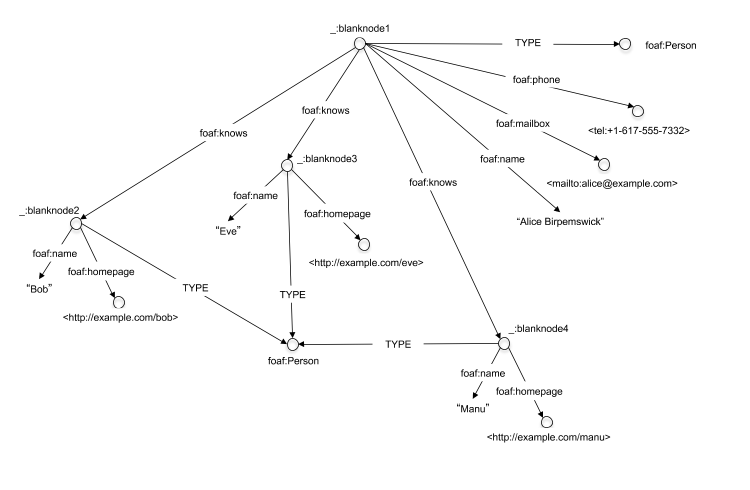
HTML5 : RDFa and Microdata for search engines
The web is a rich, distributed repository of interconnected information organized primarily for human consumption. On a typical web page, an XHTML author might specify a headline, then a smaller sub-headline, a block of italicized text, a few paragraphs of average-size text, and, finally, a few single-word links. Web browsers will follow these presentation instructions faithfully. However, only the human mind understands that the headline is, in fact, the blog post title, the sub-headline indicates the author, the italicized text is the article's publication date, and the single-word links are categorization labels. The gap between what programs and humans understand is large.
MicroData Formats
HTML5 Microdata: Welcome to the Machine
Microdata is a subset of making a document have meaning to machines, just as it has meaning to a reader of the document. With meaning, I mean providing the meta data in a way that can be used by a machine reading the document and to allow that data to be processed
RDFa
RDFa, which provides a set of XHTML attributes to augment visual data with machine-readable hints. We show how to express simple and more complex datasets using RDFa, and in particular how to turn the existing human-visible text and links into machine-readable data without repeating content

MicroData Formats
HTML5 Microdata: Welcome to the Machine
Microdata is a subset of making a document have meaning to machines, just as it has meaning to a reader of the document. With meaning, I mean providing the meta data in a way that can be used by a machine reading the document and to allow that data to be processed
RDFa
RDFa, which provides a set of XHTML attributes to augment visual data with machine-readable hints. We show how to express simple and more complex datasets using RDFa, and in particular how to turn the existing human-visible text and links into machine-readable data without repeating content
Subscribe to:
Posts (Atom)