Image w/ description tooltip
Move the mouse over a link and have the image of your choice plus corresponding description pop up, by using this image tooltip script. Each tooltip can have a different background color, just for aesthetics or in case the images are transparent gifs.
The code detects for window edges and keeps the tooltip inside. The tooltip moving with the mousemove is an option that can be turned off by setting the tipFollowMouse to false.
Friday, April 16, 2010

Thursday, April 15, 2010
Ajax Availability Calendar is a php script
The Ajax Availability Calendar is a php script designed to show availability of whatever you might need it for (eg. holiday cottage, hotel rooms etc.).
Free to use on your website or application and is currently being used (v.2) by hundreds, if not thousands, of websites around the world.

Free to use on your website or application and is currently being used (v.2) by hundreds, if not thousands, of websites around the world.

books showcase - css / jquery / flash / mysql
This widget lets you display images in a rich interactive visualization similar to that of Apple iTunes known as Cover Flow. It is a Flash-based implementation.
flash book store shelf
flash book store shelf
Progressive enhancement: pure CSS speech bubbles
Progressive enhancement: pure CSS speech bubbles
Speech bubbles are a popular effect but many tutorials rely on presentational HTML or JavaScript. This tutorial contains various forms of speech bubble effect created with CSS2.1 and enhanced with CSS3. No images, no JavaScript and it can be applied to your existing semantic HTML.

Speech bubbles are a popular effect but many tutorials rely on presentational HTML or JavaScript. This tutorial contains various forms of speech bubble effect created with CSS2.1 and enhanced with CSS3. No images, no JavaScript and it can be applied to your existing semantic HTML.

Yahoo Geo-Location Library
YQL Geo Library - get all your geo needs in JavaScript - geolocation, reverse geocoding, content analysis
As an aid for the Georgia Tech Hack 2010 and as a follow-up to my talk about geolocation here is a simple JavaScript library that answers most of your geo questions. It wraps the following services in a simple interface:

As an aid for the Georgia Tech Hack 2010 and as a follow-up to my talk about geolocation here is a simple JavaScript library that answers most of your geo questions. It wraps the following services in a simple interface:

jquery accordian
Grid Accordion with jQuery
Accordions are a UI pattern where you click on a title (in a vertical stack of titles) and a panel of content reveals itself below. Typically, all other open panels close when the new one opens. They are a clever and engaging mechanism for packing a lot of information in a small space.

Accordions are a UI pattern where you click on a title (in a vertical stack of titles) and a panel of content reveals itself below. Typically, all other open panels close when the new one opens. They are a clever and engaging mechanism for packing a lot of information in a small space.

jquery data picker
Using jsDatePick
jsDatePick is a javascript date picker that uses DOM techniques to generate its HTML code. Read the parameters and working examples below, and within minutes, you can have a popup date picking solution on your website.
Read below for full documentation of parameters, and to download jsDatePick. We developed jsDatePick as a custom date picking module for our web-based money management software - check it out if you like.
jsDatePick is a javascript date picker that uses DOM techniques to generate its HTML code. Read the parameters and working examples below, and within minutes, you can have a popup date picking solution on your website.
Read below for full documentation of parameters, and to download jsDatePick. We developed jsDatePick as a custom date picking module for our web-based money management software - check it out if you like.
web resources - php / jquery / security references
web resources for php / jquery / html security / images / scripts available here
great treasure for scripts
great treasure for scripts
simple slider - jquery
it's easy
The package is based around the way you already build your website, so you don’t have to retain swaths of arbitrary knowledge to use it on a regular basis.
simple slider - jquery
The package is based around the way you already build your website, so you don’t have to retain swaths of arbitrary knowledge to use it on a regular basis.
simple slider - jquery
color codes - html
0to255 is a simple tool that helps web designers find variations of any color.
Basically, it's a simple tool that helps web designers find lighter and darker colors based on any color. Why is this necessary? Well, that takes a little more explanation.
color codes
Basically, it's a simple tool that helps web designers find lighter and darker colors based on any color. Why is this necessary? Well, that takes a little more explanation.
color codes
Tuesday, April 13, 2010
CSS Audio Font
A web document can be rendered by a speech synthesizer. CSS2 allows you to attach specific sound style features to specific document elements.
Aural rendering of documents is mainly used by the visually impaired. Some of the situations in which a document can be accessed by means of aural rendering rather than visual rendering are the following.
CSS Voice & Speach Examples
http://www.cssdog.com/css_aural_media.html
http://www.w3.org/TR/css3-speech/
using custom font ::
http://www.howtoplaza.com/how-to-use-custom-fonts-on-your-website-with-css
Aural rendering of documents is mainly used by the visually impaired. Some of the situations in which a document can be accessed by means of aural rendering rather than visual rendering are the following.
CSS Voice & Speach Examples
http://www.cssdog.com/css_aural_media.html
http://www.w3.org/TR/css3-speech/
using custom font ::
http://www.howtoplaza.com/how-to-use-custom-fonts-on-your-website-with-css
Monday, April 12, 2010
Using HTML Symbol Entities
Using HTML Symbol Entities


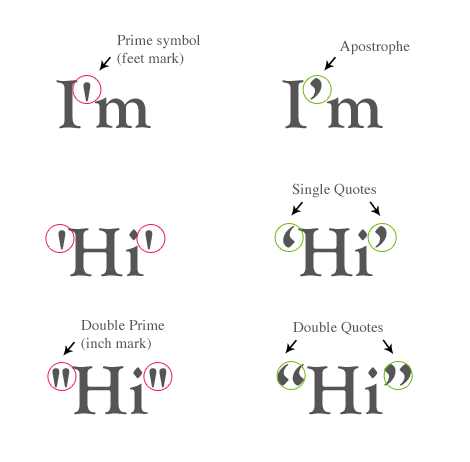
Some characters (e.g. the less than and greater than signs) are reserved for HTML markup. In order to display these characters as text, you must enter the HTML entities in the source code. For example, to display the less than sign (<), you need to enter < (entity name) or < (entity number). Among the entity list, there are quite a lot of symbol entities that we can use in layout design. For examples: → ♥ ♫ ✓ ✗ • ☞ ✁ ★ “ ⊕. Have you seen the snowman ☃ symbol before? If not, continue on this post to find more surprises.

Tuesday, April 6, 2010
Facebook Style Footer Admin Panel
Facebook Style Footer Admin Panel
The popularity of social media has been booming in the past few years and Facebook definitely has climbed high to the top of the social network rankings. Facebook has many Ajax driven features and applications that are very impressive, and one of the things I particularly like is the footer admin panel, where it neatly organizes frequently used links and applications.
This week I would like to cover part 1 of how to recreate the Facebook footer admin panel with CSS and jQuery.

The popularity of social media has been booming in the past few years and Facebook definitely has climbed high to the top of the social network rankings. Facebook has many Ajax driven features and applications that are very impressive, and one of the things I particularly like is the footer admin panel, where it neatly organizes frequently used links and applications.
This week I would like to cover part 1 of how to recreate the Facebook footer admin panel with CSS and jQuery.

VALIDATE FORMS LIKE YOU'VE NEVER BEEN VALIDATING BEFORE!
VALIDATE FORMS LIKE YOU'VE NEVER BEEN VALIDATING BEFORE!
"But doesn't jQuery make it so very easy to write your own validation plugin?" Sure, but there still are a lot of subtleties that you have to worry about: You need a standard library of validation methods (think of emails, URLs, credit card numbers). You need to place error messages in the DOM and show and hide them when appropriate. You want to react to more than just a submit event, like keyup and blur. You may need different ways to specify validation rules, based on the server-side enviroment you are using on different projects. And after all, you don't want to reinvent the wheel, do you?
"But doesn't jQuery make it so very easy to write your own validation plugin?" Sure, but there still are a lot of subtleties that you have to worry about: You need a standard library of validation methods (think of emails, URLs, credit card numbers). You need to place error messages in the DOM and show and hide them when appropriate. You want to react to more than just a submit event, like keyup and blur. You may need different ways to specify validation rules, based on the server-side enviroment you are using on different projects. And after all, you don't want to reinvent the wheel, do you?
AutoCompleter Tutorial – jQuery(Ajax)/PHP/MySQL
AutoCompleter Tutorial – jQuery(Ajax)/PHP/MySQL
I thought i would write this tutorial because most of the auto completer applications i have seen just dump the code into a zip and tell you how to use it rather than how and why it works, knowing about this enables you to customise it a lot more (this has been demonstrated with the other apps i have written here)!

I thought i would write this tutorial because most of the auto completer applications i have seen just dump the code into a zip and tell you how to use it rather than how and why it works, knowing about this enables you to customise it a lot more (this has been demonstrated with the other apps i have written here)!

Subscribe to:
Posts (Atom)