Search This Blog

Monday, June 14, 2010

10 Compelling Reasons to Use Zend Framework

10 Compelling Reasons to Use Zend Framework

Zend Framework is a fully object-oriented framework, and as such, it utilizes a lot of object-oriented (OO) concepts like inheritance and interfaces. This makes most, if not all, of ZF’s components extendable to some point. It allows developers to implement their own special variations of individual components without having to hack into the ZF codebase itself. Being able to customize ZF this way allows you to create functionality that is unique to your project, but because of its object-oriented nature, you’ll be able to use this functionality in other projects as well.

Introduction to MySQL Triggers

Introduction to MySQL Triggers

a trigger is a rule that you put on a table which basically says, whenever you DELETE, UPDATE or INSERT something in this table, also do something else. For instance, we might want to log a change, but instead of writing two separate queries, one for the change, and one for the log, we can instead write a trigger that says, “Whenever this row is updated, create a new row in a different table to tell me that the update was made”. It adds a little overhead to the initial query, but since there are not two packets traveling to your database to do two separate things, there is an overall performance gain (in theory anyway).

css - page reflection

Quick Tip: Pure CSS Reflections

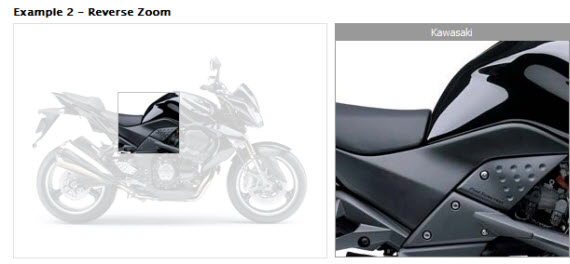
Many might not be aware that, with CSS, we can achieve reflections quite easily in all webkit-based browsers, which represent roughly 20% of all browser usage. The key is in the vendor-specific, -webkit-box-reflect property. I’ll show you how to use it in today’s video quick tip!


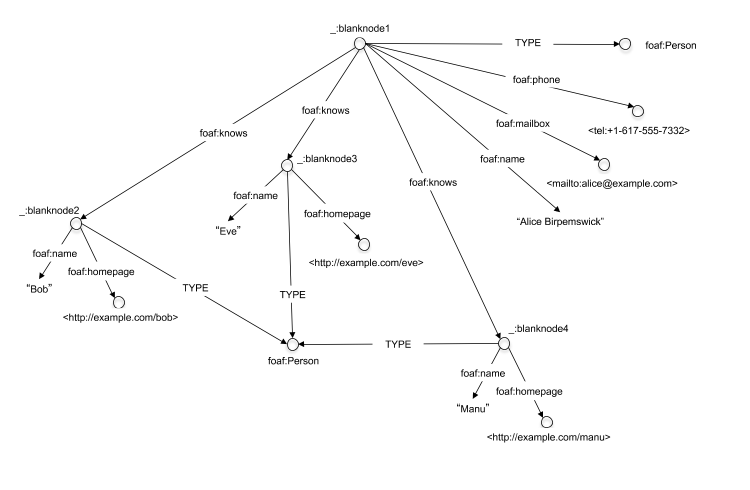
HTML5 : RDFa and Microdata for search engines

The web is a rich, distributed repository of interconnected information organized primarily for human consumption. On a typical web page, an XHTML author might specify a headline, then a smaller sub-headline, a block of italicized text, a few paragraphs of average-size text, and, finally, a few single-word links. Web browsers will follow these presentation instructions faithfully. However, only the human mind understands that the headline is, in fact, the blog post title, the sub-headline indicates the author, the italicized text is the article's publication date, and the single-word links are categorization labels. The gap between what programs and humans understand is large.

MicroData Formats
HTML5 Microdata: Welcome to the Machine

Microdata is a subset of making a document have meaning to machines, just as it has meaning to a reader of the document. With meaning, I mean providing the meta data in a way that can be used by a machine reading the document and to allow that data to be processed


RDFa

RDFa, which provides a set of XHTML attributes to augment visual data with machine-readable hints. We show how to express simple and more complex datasets using RDFa, and in particular how to turn the existing human-visible text and links into machine-readable data without repeating content


Tuesday, June 8, 2010

jQuery Quotes Slider

jquery Quotes slider - great design only comes with clickable sliding interface

< demo >

Wednesday, June 2, 2010

Using MySQL, Joins

Using MySQL, Joins

using the SQL JOIN Syntax. Most databases have multiple tables to avoid repeating data. i.e. why enter the details of a customer over and over again.

Thursday, May 27, 2010

on force window close - script

onbeforeunload Event

when user does not logout from the web application - for force logout use this code snippet


<HTML>
<head>
<script>
function closeIt()
{
return "Any string value here forces a dialog box to \n" +
"appear before closing the window.";
}
window.onbeforeunload = closeIt;
</script>
</head>
<body>
<a href="http://www.microsoft.com">Click here to navigate to
www.microsoft.com</a>
</body>
</html>

Tuesday, May 25, 2010

twitter - jquery

twitter - jquery

In this tutorial we are going to create a pure jQuery & CSS twitter ticker which utilizes Twitter’s Search API. It will show your or your friends’ latest tweets, and will not require any server side code or databases. As a result, the ticker will be easily included into any web page and easily modified to your likings.

jquery pagination

jquery pagination

jQuery paginator is based on the jQuery Pagination plugin originally written by Gabriel Birke. For information, documentation and license please visit http://plugins.jquery.com/project/pagination
jQuery paginator plugin file already includes the required jQuery pagination plugin.

10 Attractive Jquery CSS Tooltips Tutorials

10 Attractive Jquery CSS Tooltips Tutorials

Tooltips are a great way to pour life in your simple html content. They are easy to do with little jquery and css. You page gets attractive and users like techy stuff on websites.
Here are some of the tutorials gathered from different sites.

Read more at: http://yestutor.blogspot.com/2010/05/10-attractive-jquery-css-tooltips.html#ixzz0oxe0fdkv

interesting jQuery calendar plugins

interesting jQuery calendar plugins

jQuery is a fast and concise JavaScript Library that simplifies HTML document traversing, event handling, animating, and Ajax interactions for rapid web development.

In this article, you will read about the 7 interesting jQuery calendar plugins .

Thursday, May 6, 2010

jQuery Styles - A Website

Has some stunning website designed using jQuery components with absolute marvalous creative way.

Must refer for new website designs never forget.

jQuery Style Websites

image sliders and photo galleries

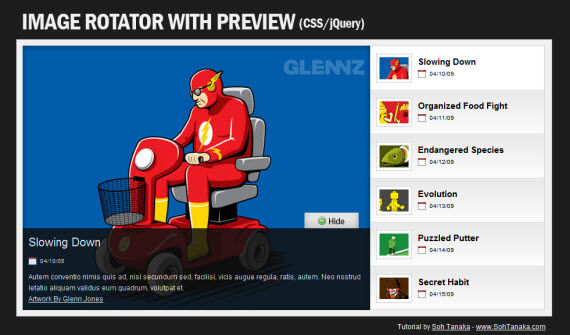
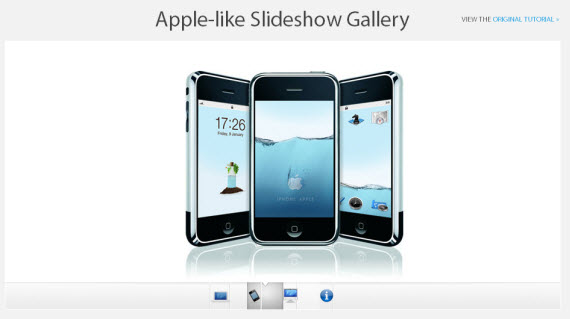
jQuery is becoming present in more Web 2.0 sites. jQuery slideshows or galleries take a grouping of images and turn it into an flash-like image/photo gallery. Here is a list of top options available for your website’s photo gallery.

Blue Prints - 14 jQuery Sliders & Gallery Designs


37 Designs Sliders & Gallery


Tuesday, May 4, 2010

yaflaColor - Simple Web Color Utility And RGB/HSV Conversion

Pick best chromed colors for website from here

Creating a Slide-in jQuery Contact Form

Creating a Slide-in jQuery Contact Form

Contact forms are an indispensable part of every website. They are mostly implemented on a separate page and they rarely display creativity, even though there are many ways to improve their visual style. In this tutorial you will see how to create a dynamic, slide-in contact form using jQuery.

Let’s see what we’re trying to achieve with this tutorial. The image below shows the layout of our goal. In the upper right corner of the content is “Contact us” link. When the user clicks on it, the contact form will slide down. When the user submits the form they will get a message that their message has been sent successfully and within two seconds, the entire form will slide up.

content-wide advt